SSH · RDP · VNC · Telnet · Serial

Every server you run, in one encrypted vault.

Duo22 is a desktop client for SSH, remote desktops, Telnet and serial consoles. Your hosts, keys and snippets sync across your devices and share with your team, end-to-end encrypted. The server only ever sees ciphertext.

macOS (Apple Silicon) Windows Linux

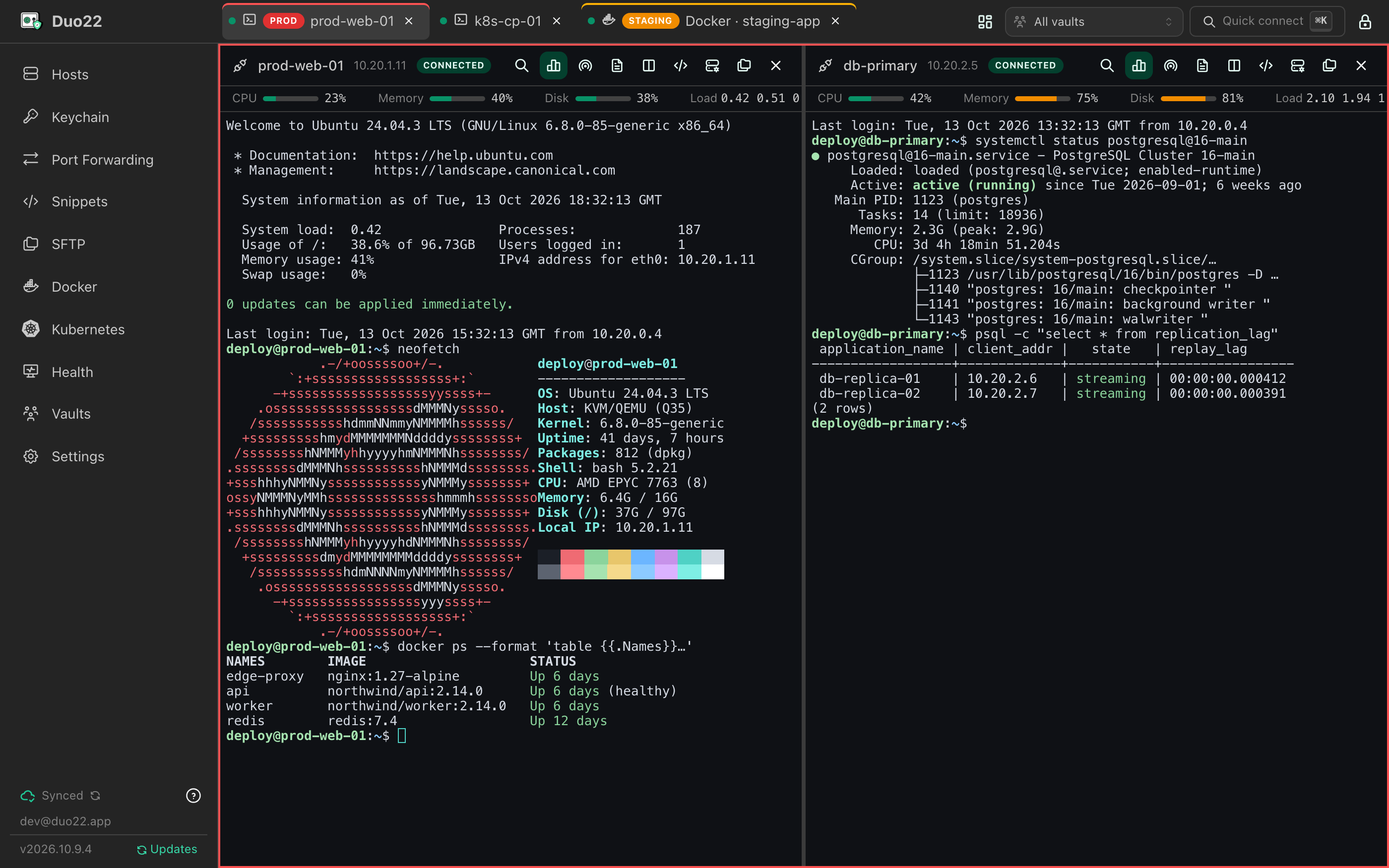
Duo22 with SSH tabs open: a split view of prod-web-01 and db-primary, with live CPU, memory and disk for each host, and tabs edged red for production and yellow for staging.

Features

One app for the whole fleet

From a jump host to a Raspberry Pi on a serial cable: connect, transfer, tunnel and manage containers without switching tools.

  • SSH in tabs

    Fast WebGL terminals with search, split panes and ProxyJump through jump hosts. Tabs take their host's tag colour, so production stands out.

  • RDP & VNC

    Windows desktops over RDP with Network Level Authentication, Linux desktops over VNC, optionally tunnelled through SSH.

  • Telnet & serial

    Telnet with window size negotiation, and serial consoles on this computer's ports with baud rate, parity and flow control.

  • SFTP, dual-pane

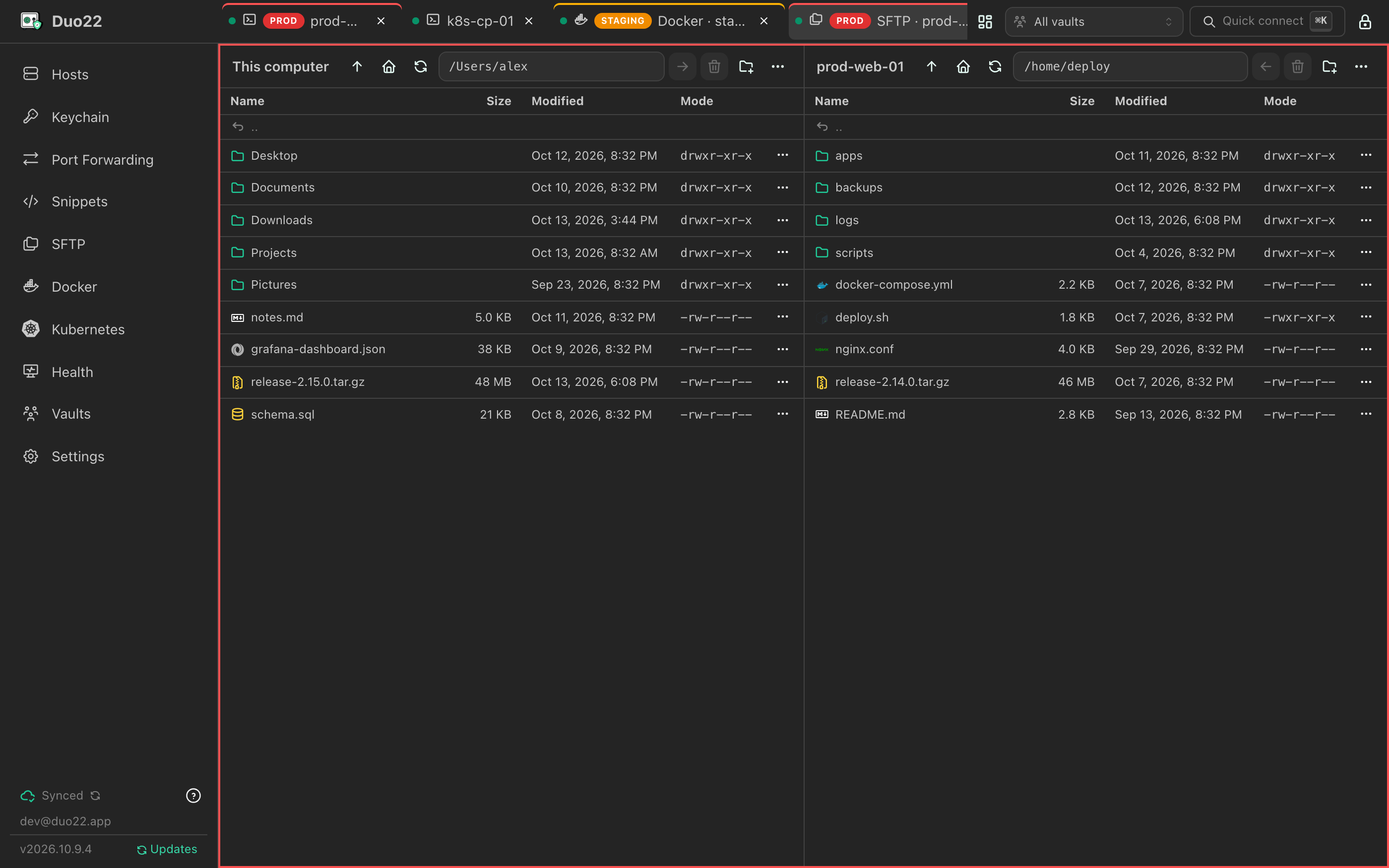
    Drag between panes or drop files from Finder and Explorer. Recursive transfers with progress, rename, delete and chmod.

  • Port forwarding

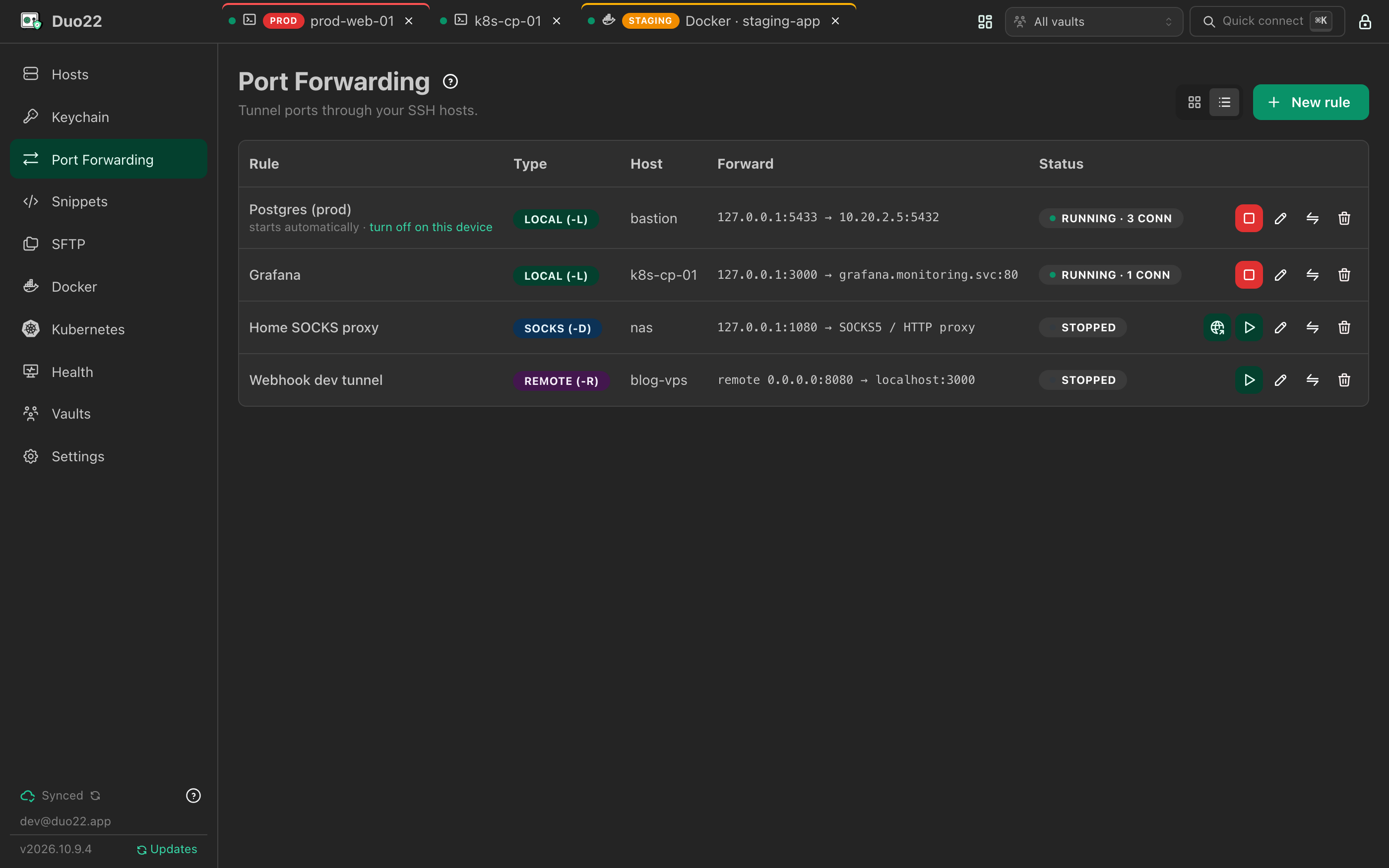
    Local (-L), remote (-R) and dynamic SOCKS5 (-D) tunnels with live status, and auto-start on the devices you choose.

  • Docker over SSH

    Containers grouped by Compose project: start, stop, logs and a shell inside. Nothing to install on the server.

  • Snippets & broadcast

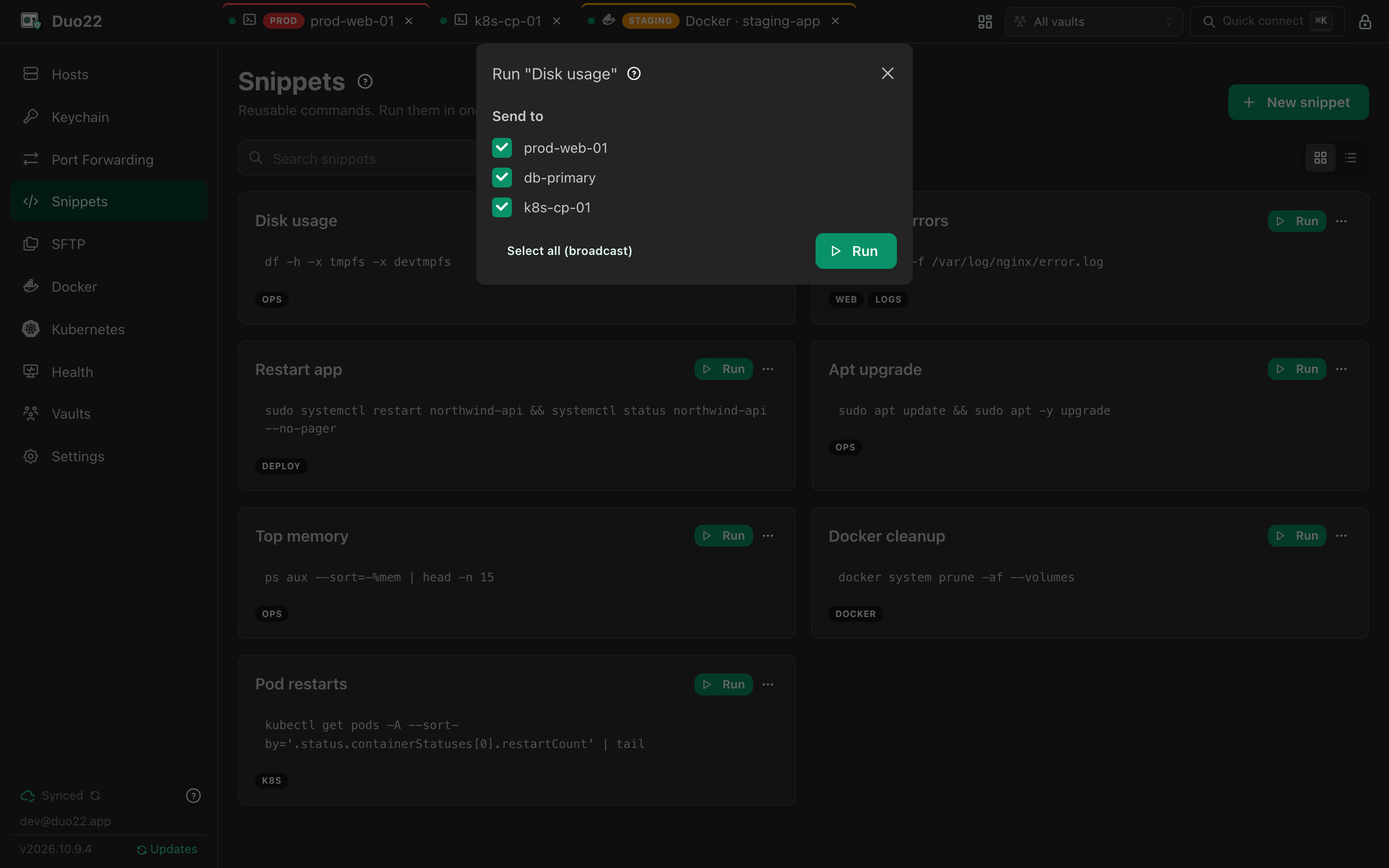
    Save the commands you keep typing. Run one in a terminal, or broadcast it to every terminal you have open.

  • Network scan

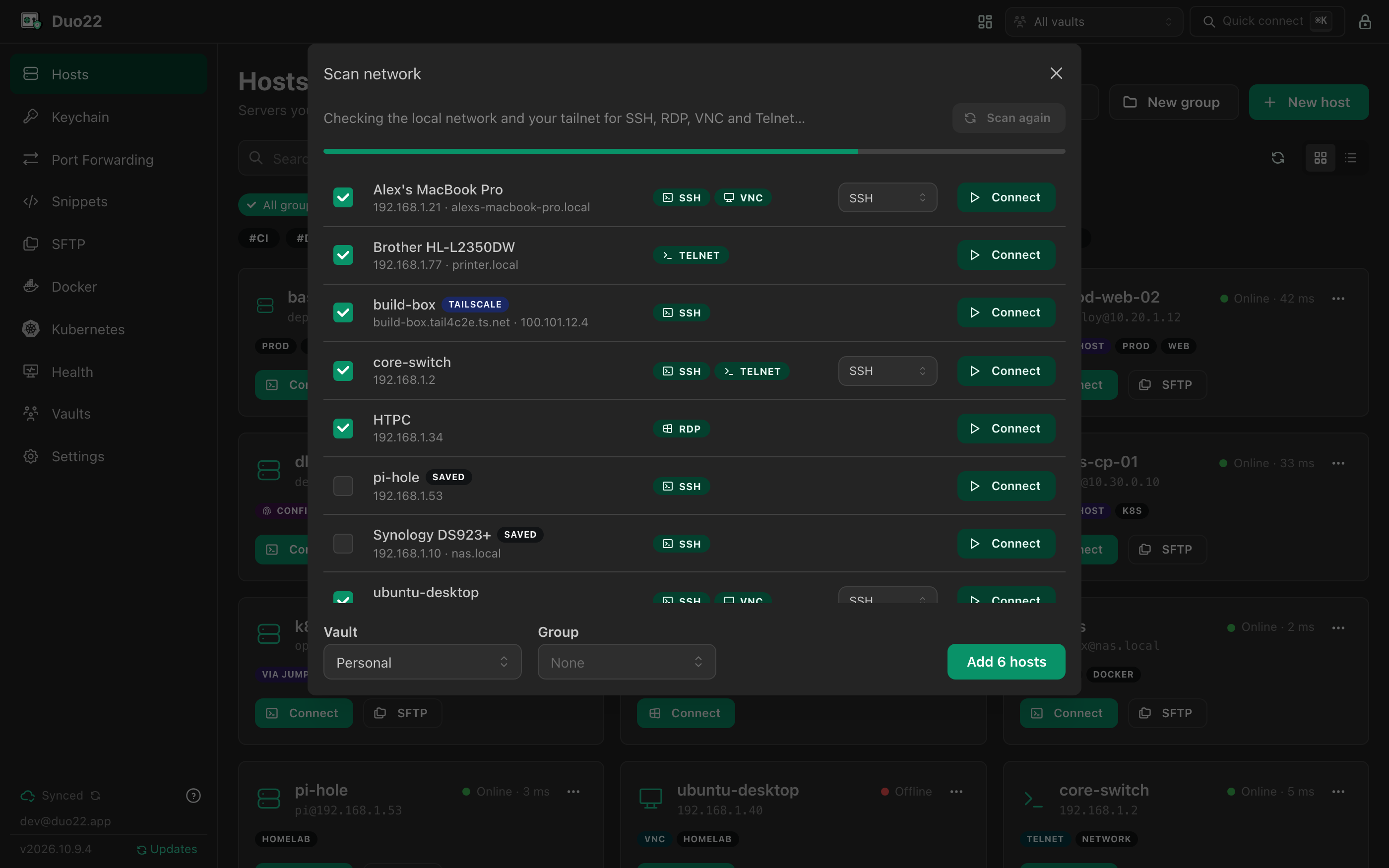
    Finds SSH, RDP, VNC and Telnet devices on your network and tailnet, to save to a vault or connect to once.

  • Shared vaults

    Owner, editor and viewer roles. Invitations must be accepted, and removing a member rotates the vault's key.

  • Works offline

    A local encrypted cache keeps everything at hand. Edits made offline sync when you're back.

  • Quick connect

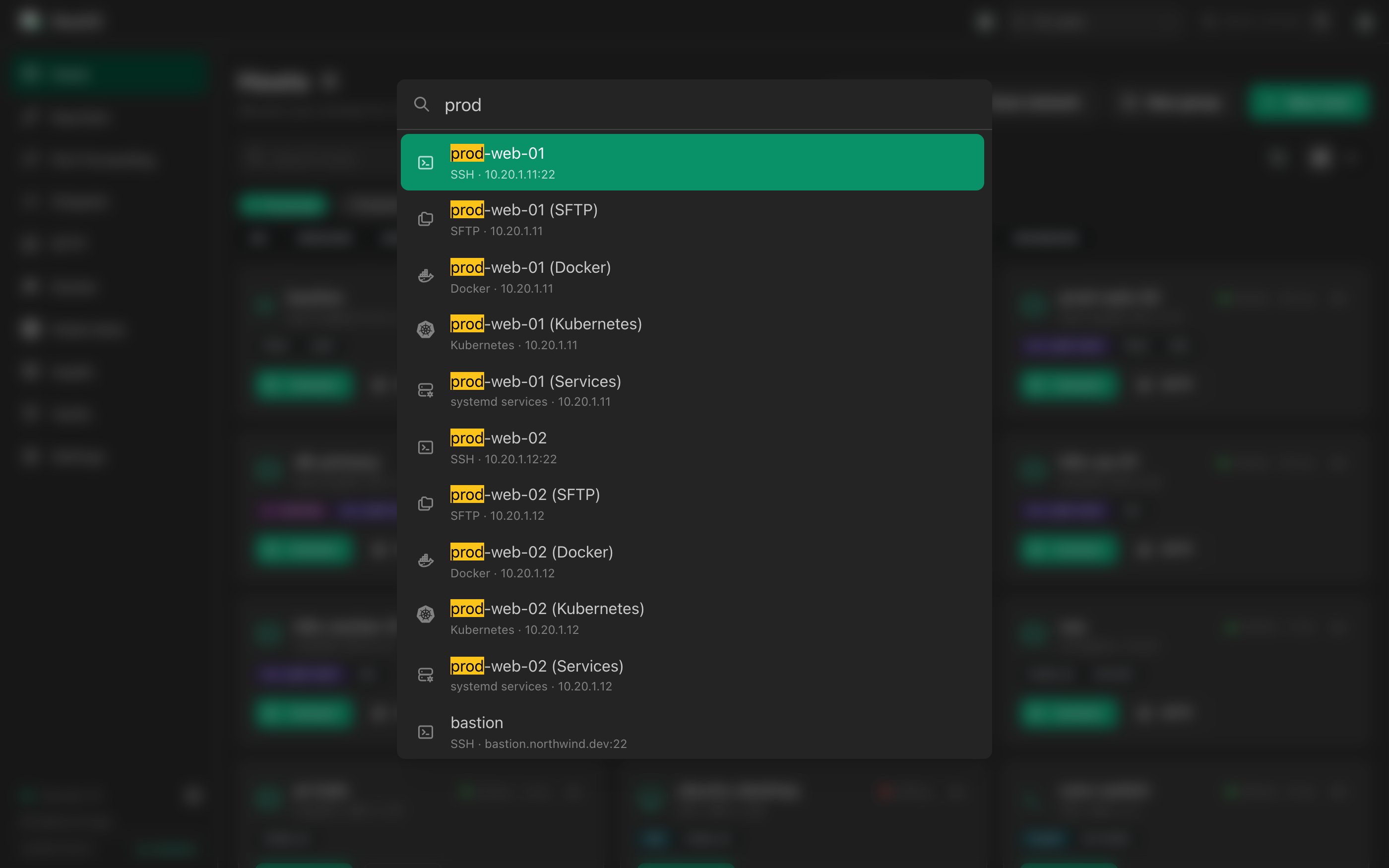
    Press ⌘K and type: any host over SSH, SFTP, Docker or Kubernetes, a saved workspace, or any page in the app.

  • Touch ID & auto-lock

    Locks itself after inactivity. On a Mac, optionally unlock with Touch ID until the end of the day.

Tour

See it in action

Real screens from the app, filled with made-up demo data.

Organise

All your hosts, grouped, tagged and checked

Groups, tags and identities keep a few hundred hosts manageable. The hosts page shows which ones answer and how fast, including those behind a jump host.

  • SSH, RDP, VNC, Telnet and serial in one list
  • Import from OpenSSH, PuTTY, SecureCRT or CSV
  • Host keys and RDP certificates trusted on first use, and synced
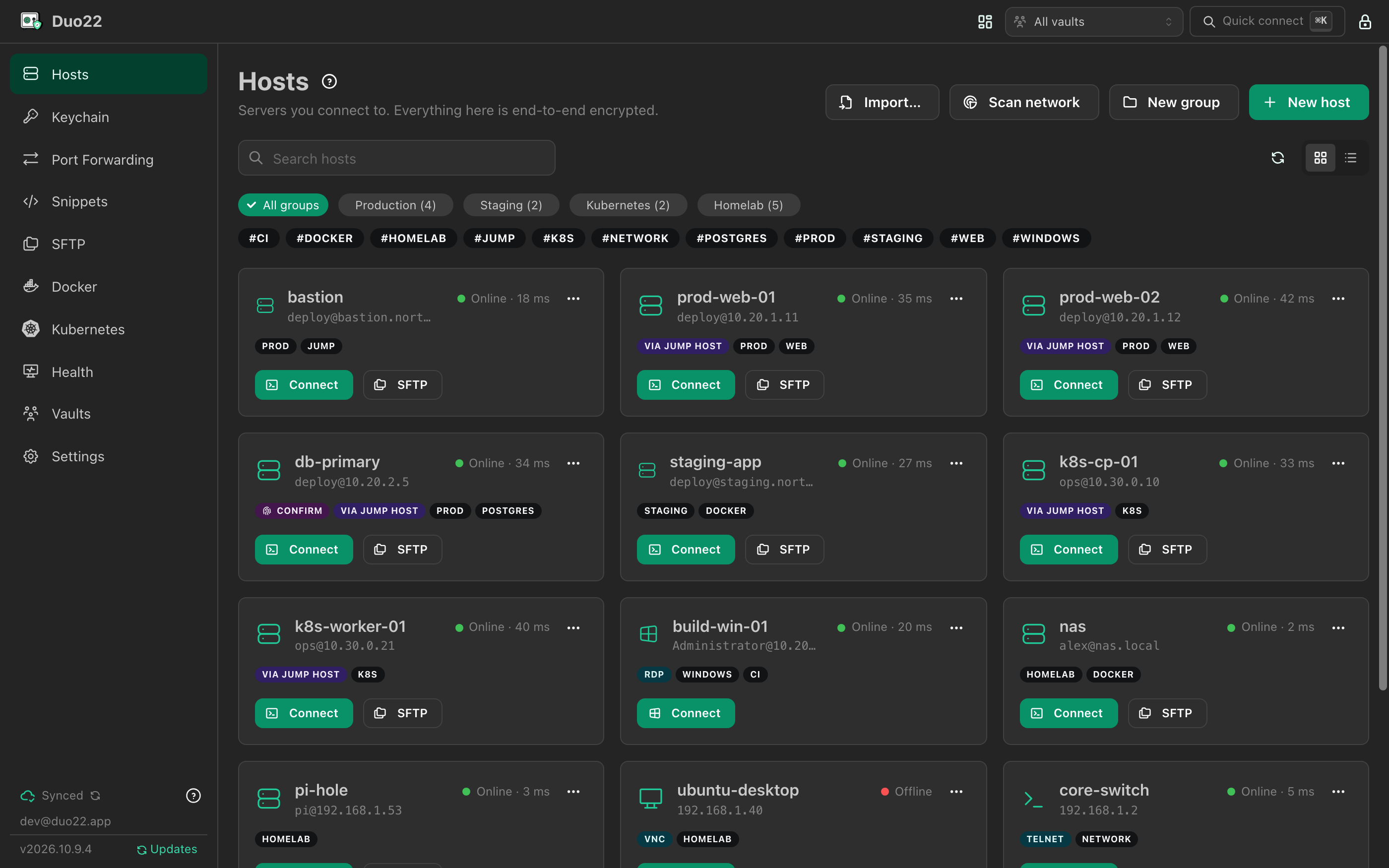
Duo22: All your hosts, grouped, tagged and checked

Connect

Terminals that keep up

Split a tab into up to four terminals, each with its host's CPU, memory and disk at a glance. Save a set of tabs as a workspace and open it again in one go.

  • Search, session logs and automatic reconnect
  • Live-share a terminal, read-only, with your vault
  • Tab colours by tag, e.g. red for prod
Duo22: Terminals that keep up

⌘K

Everything is a few keystrokes away

Quick connect finds any host and opens it the way you want: a terminal, SFTP, Docker, Kubernetes or its systemd services.

  • Workspaces and pages too
  • Narrow it to one vault from the header
Duo22: Everything is a few keystrokes away

Transfer

Files, side by side

This computer on the left, the server on the right. Drag between them, or drop files in from Finder or Explorer, and edit remote text files in place.

  • Recursive uploads and downloads with progress
  • Rename, delete and chmod
  • Downloads can't write outside the folder you chose
Duo22: Files, side by side

Containers

Docker on any host, over SSH

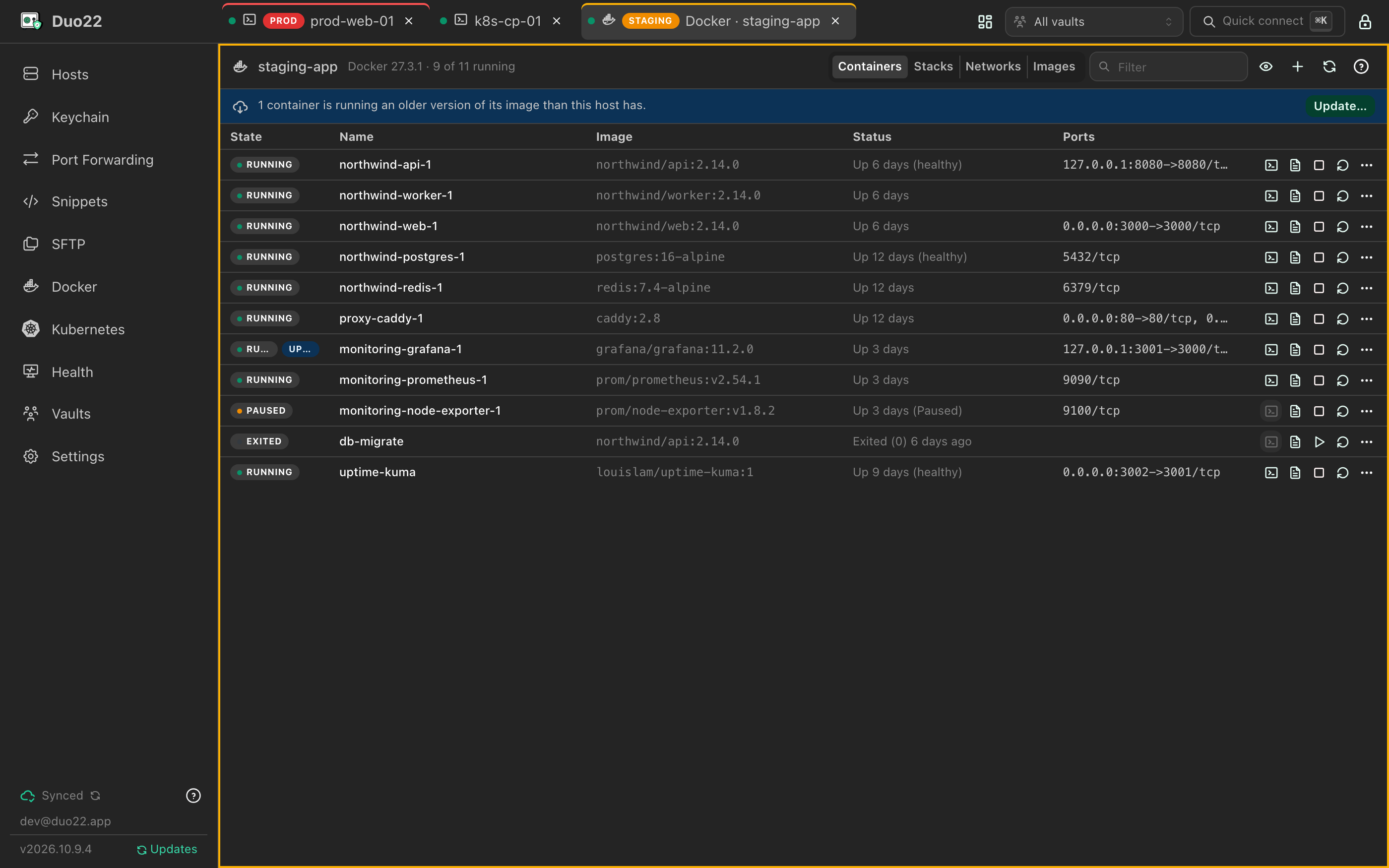
Duo22 runs the host's own docker (or podman) over your SSH connection. Start, stop, restart and remove containers, follow their logs, or open a shell inside.

  • Compose stacks, networks and images
  • Spot containers running an outdated image
  • Nothing to install on the server
Duo22: Docker on any host, over SSH

Clusters

Kubernetes through the kubectl you already have

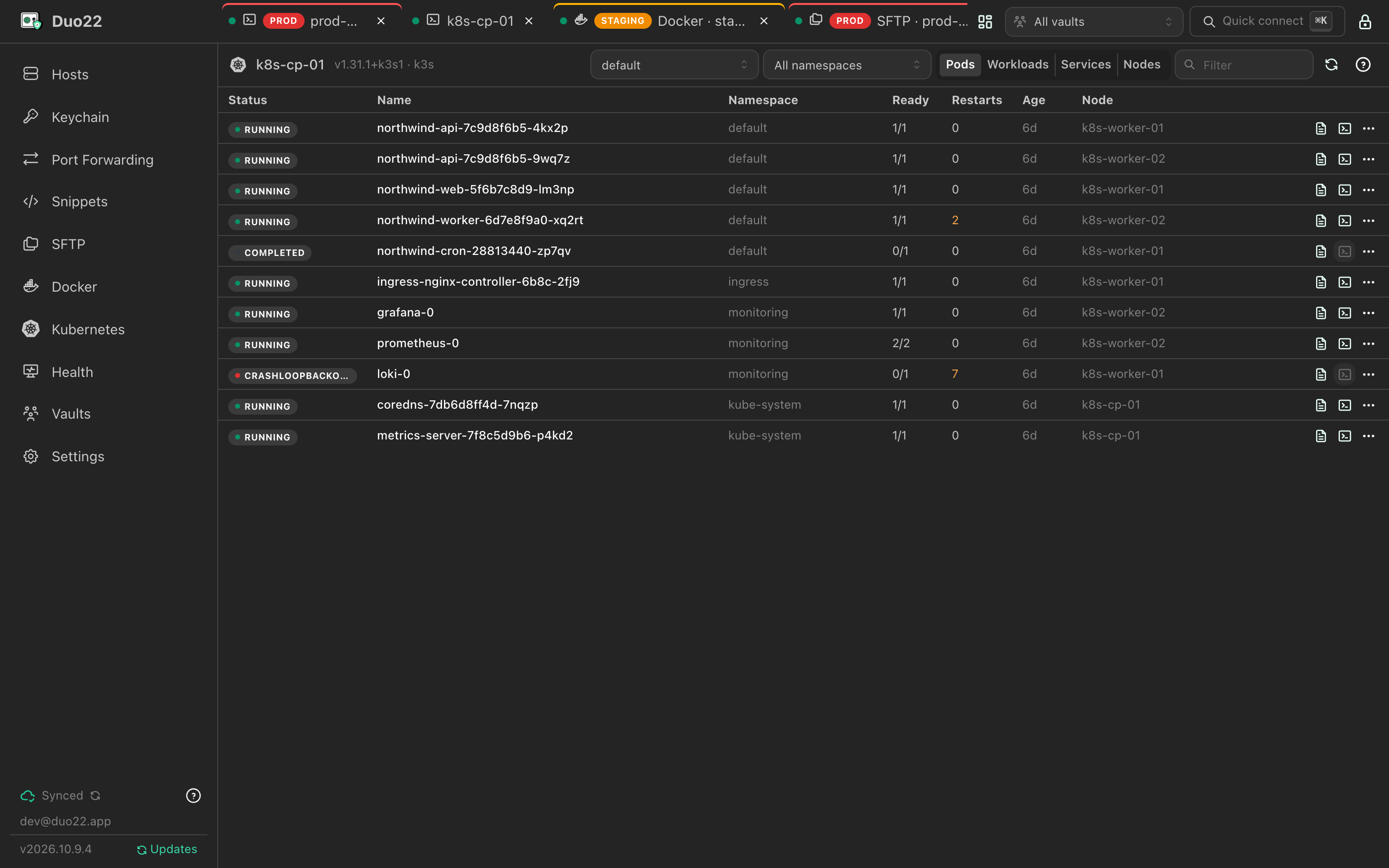
Pods, workloads, services and nodes from a host's own kubectl, k3s or microk8s. Describe, view YAML, restart, scale, or open logs and a shell in a pod.

  • Every context in the host's kubeconfig
  • No API server exposed to your device
Duo22: Kubernetes through the kubectl you already have

Tunnel

Tunnels with a status light

Local, remote and dynamic SOCKS5 forwards, each with its live state and open connections. Route this device's traffic through a SOCKS rule with one click.

  • Auto-start after unlocking, opted into per device
  • A shared vault can never start a tunnel on its own
Duo22: Tunnels with a status light

Automate

Run it once, everywhere

Snippets live in the vault next to your hosts, so the team shares them too. Send one to a single terminal or broadcast it to all of them.

  • Tags and search
  • Synced and end-to-end encrypted like everything else
Duo22: Run it once, everywhere

Discover

Find what's on the network

Bonjour, a port sweep of your subnet and your Tailscale tailnet turn up SSH, RDP, VNC and Telnet devices. Add them to a vault in bulk, or connect once without saving.

  • Already-saved devices are marked
  • Pick the protocol for devices that offer several
Duo22: Find what's on the network

Monitor

Know when a host goes down

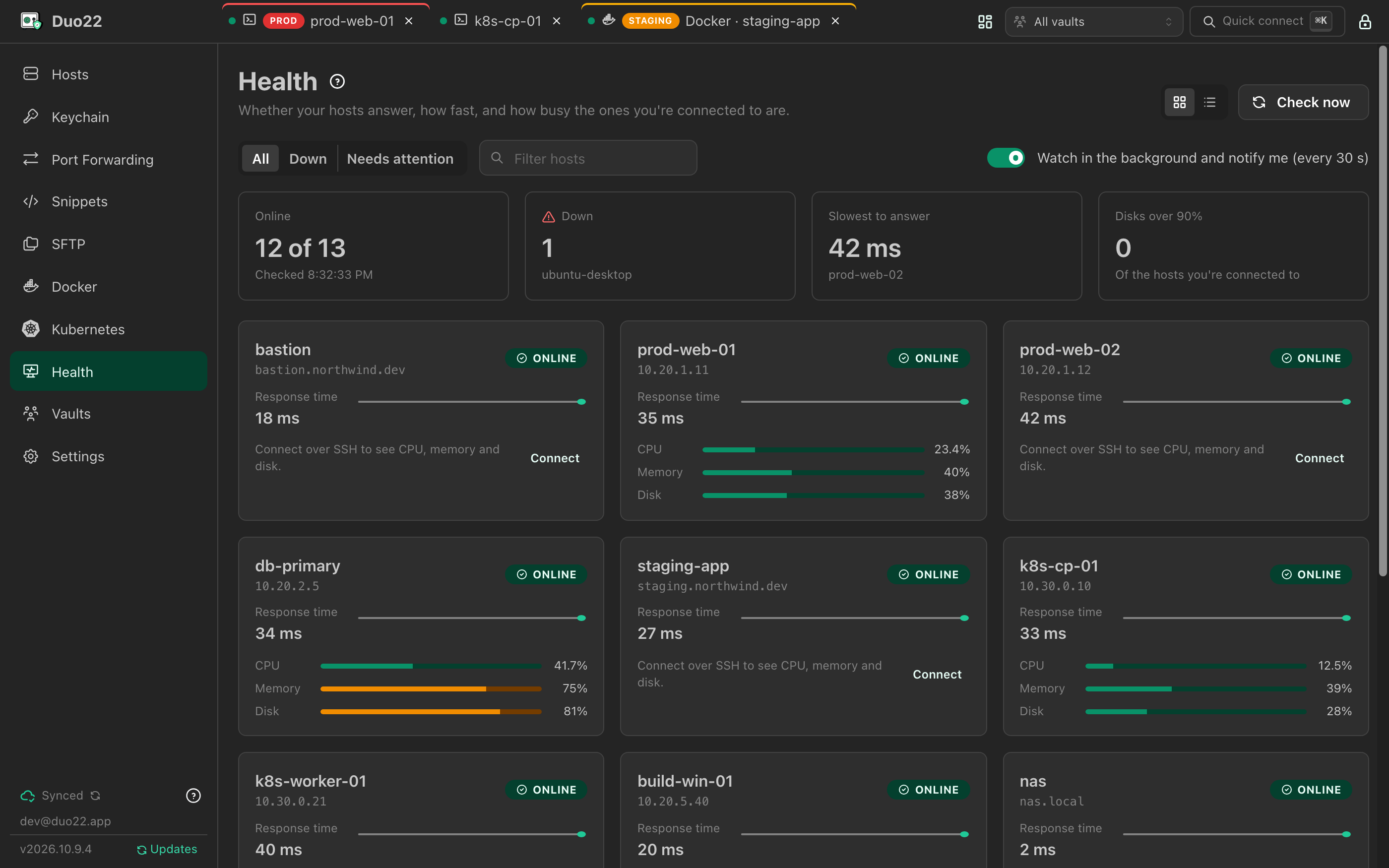
See which hosts answer, how quickly, and how busy the ones you're connected to are. Background checks notify you when a host stops answering or its disk fills up.

Duo22: Know when a host goes down

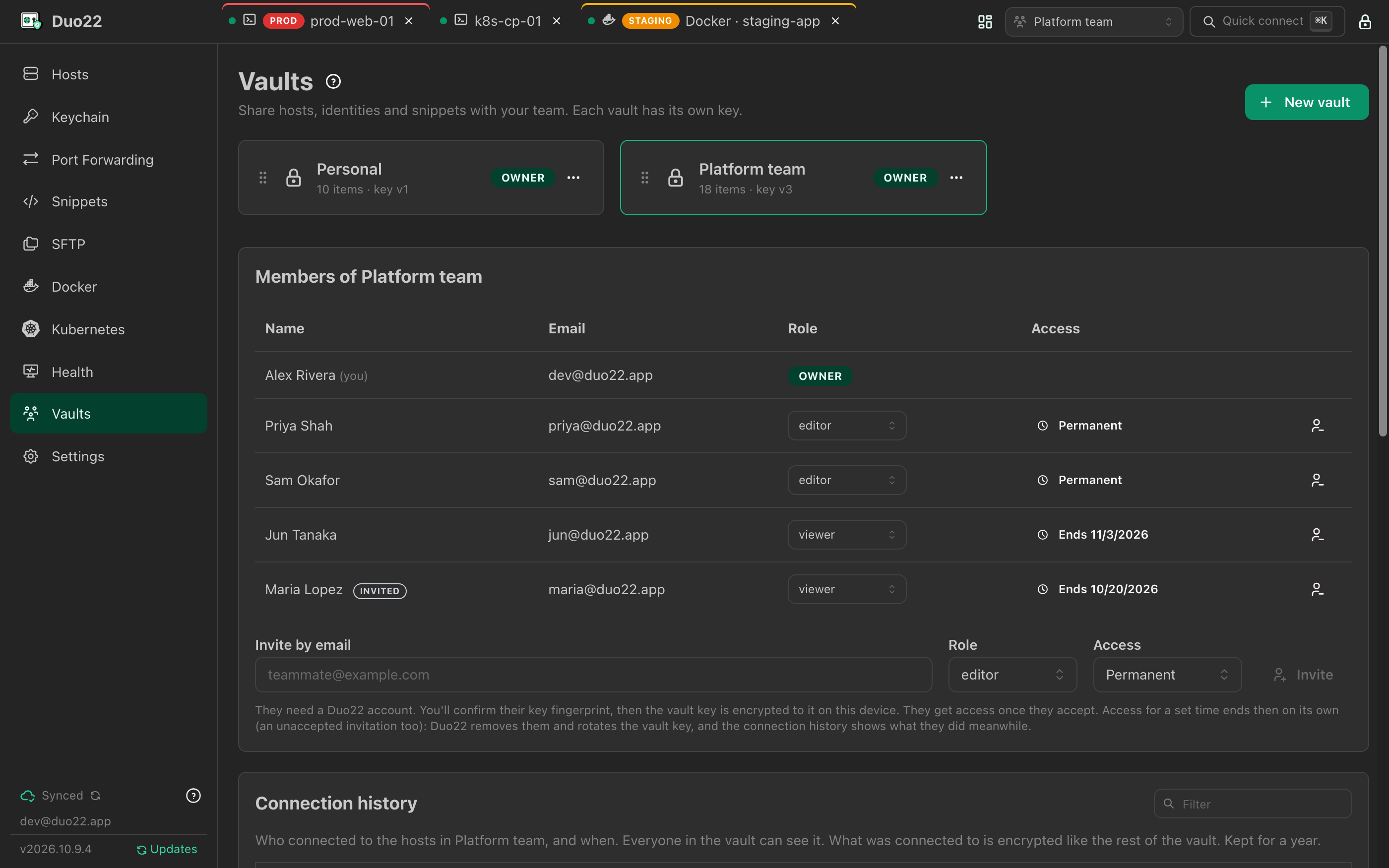
Share

Share a vault, not a password

Give your team a vault of hosts, identities and snippets with owner, editor or viewer roles, for good or until a date. Every connection is recorded in the vault's history.

  • You confirm a member's key fingerprint before sharing
  • Removing someone rotates the vault key
  • Hosts can only use credentials from their own vault
Duo22: Share a vault, not a password

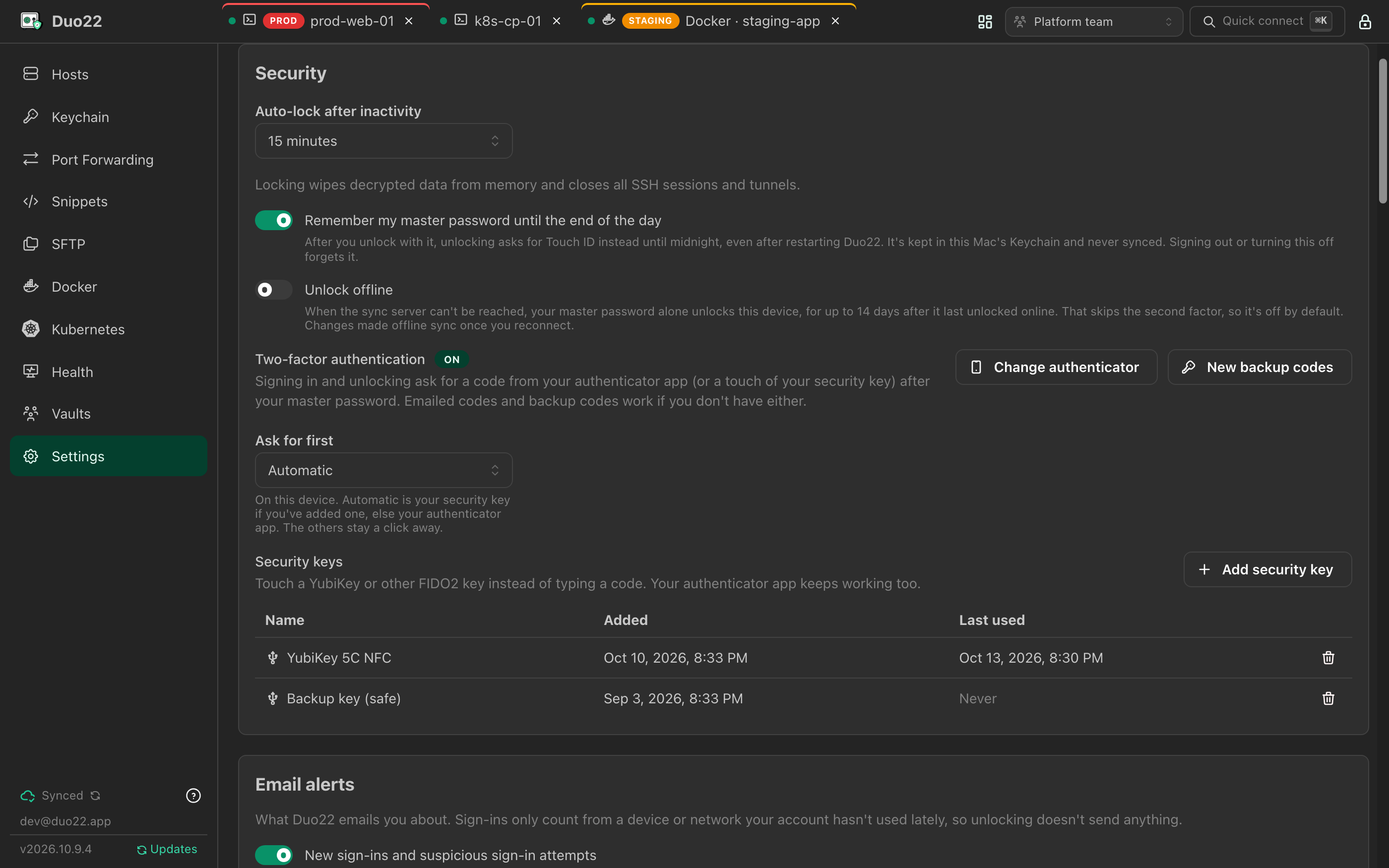
Protect

Two-factor, always

Every account uses an authenticator app, and can add YubiKeys or other FIDO2 security keys to sign in and unlock with a touch.

  • Email alerts for new sign-ins and sharing
  • A security log of what happened to your account
Duo22: Two-factor, always

Security model

Built so the server can't read your vault

Your master password is the only thing that opens your data, and it never leaves your device. Not even the people who run the sync server can see what's inside.

  • Zero-knowledge sync

    The server stores ciphertext, ids and revision numbers. It can't read your hostnames, usernames, passwords, keys, snippets, or even your vault names.

  • Sharing by public key

    A vault key is shared by sealing it to each member's X25519 public key. You compare their key fingerprint before sharing, and every device refuses a key that changed.

  • Two-factor, enforced

    Every account needs an authenticator app, checked by the server. Add a YubiKey or other FIDO2 security key and sign in with a touch.

  • Secrets stay in Rust

    Passwords, keys and every network connection live in the app's Rust core. The interface only ever sees redacted metadata, terminal output and pixels.

Download

Get Duo22

Pick the file for your computer from the latest release. Duo22 updates itself after that: each download is checked against the app's signing key before it's installed.

  • macOS

    Apple Silicon (M1 or later), macOS 11+

    Duo22_<version>_aarch64.dmgDownload
  • Windows

    Windows 10 or 11, 64-bit

    Duo22_<version>_x64-setup.exeDownload
  • Linux

    x86_64 AppImage (updates itself) or .deb

    Duo22_<version>_amd64.AppImageDownload

Intel Macs aren't supported.

The first launch

The builds aren't signed by Apple or Microsoft yet, so your computer asks you to confirm the first time you open Duo22. You only do this once: updates open without asking.

macOS
  1. Open the .dmg and drag Duo22 into Applications.
  2. Open Duo22. When macOS says it could not verify "Duo22" is free of malware, click Done.
  3. Open System Settings → Privacy & Security, and next to"Duo22" was blocked to protect your Mac click Open Anyway. Confirm with your password or Touch ID.

Or remove the quarantine flag from Terminal:

xattr -dr com.apple.quarantine /Applications/Duo22.app
Windows
  1. Run Duo22_<version>_x64-setup.exe.
  2. If SmartScreen says Windows protected your PC, click More info → Run anyway.
  3. It installs for your user only, so it doesn't need administrator rights.
Linux

AppImage (recommended; it updates itself):

chmod +x Duo22_*_amd64.AppImage
./Duo22_*_amd64.AppImage

Debian / Ubuntu (install each new .deb the same way):

sudo apt install ./Duo22_*_amd64.deb

Remember this device needs a running keyring (GNOME Keyring, KWallet). Security keys need the usual FIDO udev rules, which most distributions ship.

Duo22 syncs through api.duo22.app by default. Running your own sync server? Change Sync server on the sign-in screen; only https://servers are accepted (plain http:// only on your own machine).